


Fuelio: gas log & gas prices
4.23.60K Reviews
App Specs
- Version
- 10.3.4
- Updated On
- License
- Free
- Downloads
- 5,000,000+
- Developer
- Sygic.
- Categories
- Auto & Vehicles
- Platform
- Android, iOS
Screenshots


 Analysis by AppCompare
I usually trust a car-cost app more when it makes routine record-keeping feel manageable rather than asking me to change how I drive. That is the appeal of Fuelio: gas log & gas prices: it is a free Auto & Vehicles app from Sygic built around logging fuel, mileage and expenses. I would treat it as a practical notebook with useful calculations, not as an automatic view of every cost my car creates.
A useful record, not a verdict on your driving
Fuel records become meaningful through consistency. One fill-up can tell you what you spent that day, but a run of entries is what helps you spot whether your costs are drifting or a particular month was unusually expensive. I find that distinction important: the app can organize the information I enter, but the usefulness of the result depends on recording it carefully.
For a driver who often pays at different stations, keeping the receipt long enough to enter the fuel amount, total cost and odometer reading can turn a vague sense of “fuel is getting expensive” into a more concrete history. It can also help when you are reviewing a household budget or trying to compare your own driving periods. I would not expect the figures to explain why consumption changed on their own; route, traffic, load and driving style still matter.
Trust starts with what you choose to record
Fuelio deals with information that can feel personal even when it is ordinary: spending, mileage and, when using nearby fuel prices, location. I would pause to consider whether location-based price browsing is worth enabling for the way I use the app. If I only want a record of fill-ups, I can focus on entering those details rather than treating every available feature as essential.
That is a useful habit with any vehicle log: decide what you want to keep, and make a routine around that. I would also check the app’s current permission prompts and privacy information on my device before enabling features that rely on location or cloud syncing. Those settings and explanations are the right places to judge the choices available to me; I would not assume that any app handles personal data in a particular way without checking.
Small habits make the numbers more useful
My practical tip is to enter a fill-up while the receipt or pump display is still handy. Waiting until the end of the week makes it easier to forget the odometer reading or confuse one purchase with another. If I miss an entry, I would rather mark the gap in my own understanding than treat the next calculation as a perfect comparison.
For more than one vehicle, keeping each car’s entries separate is especially helpful when household members share costs or when one vehicle is used for commuting and another only occasionally. The trade-off is that a multi-car log needs a little discipline: choose the correct vehicle before entering a record, then keep the same habit each time. That small check can prevent a tidy-looking history from mixing two very different patterns.
Worth Reading Before You Choose

Baby Panda World Brings Quick Play to Modern Phones, but Its Game Library Feels Busy

ESPN’s Live Game View Makes Following Close Games Easier

QuizzLand Review: A Good Fit for Short Trivia Breaks, Not Every Player

Basketball Stars: Multiplayer Is Fast, but Can It Recover When Matches Go Wrong?

WEBTOON Turns Phone Updates Into a Better Reading Routine

Link to Windows Runs on Shared Habits, Not Social Feeds
Fuelio is free to start with, is rated for Everyone, and has optional in-app purchases listed from $2.99 to $14.99 per item. It has a 4.3 average from around 133,000 ratings, with more than five million installs. The app has been available since August 4, 2011; version 9.20.1 requires Android 8.0 or later. Those details suggest a well-established option, but I would still judge it by whether its everyday workflow suits me rather than by popularity alone.
First Impressions
When I first opened Fuelio, I was greeted by a clean and straightforward interface. It’s not bogged down by unnecessary features or cluttered menus, which is a massive plus for someone who just wants to get straight to the point. The design is intuitive, making it easy for even the most tech-averse users to navigate.
Tracking Your Fuel Expenses
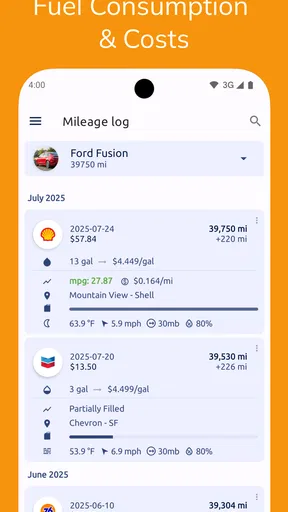
The main feature of the app is its ability to track your fuel consumption, mileage, and expenses. You simply input the fuel data each time you fill up your tank, and the app does the rest. I was surprised at how easy it was to log this information. You can enter details such as the fuel amount, total cost, and current odometer reading. Once entered, the app calculates your fuel economy, providing insights into your driving habits.
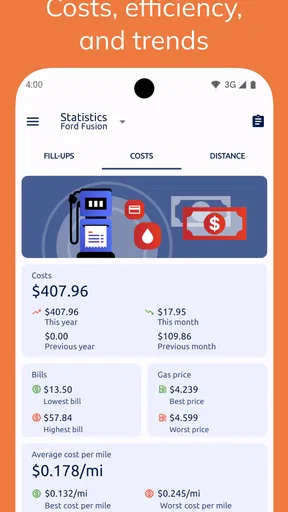
One feature I particularly appreciated is the ability to view detailed statistics over time. You can check monthly summaries, see trends over several months, and even compare different time periods. It’s like having a personal finance assistant dedicated to your car’s fuel consumption.
Gas Prices and Cost Efficiency
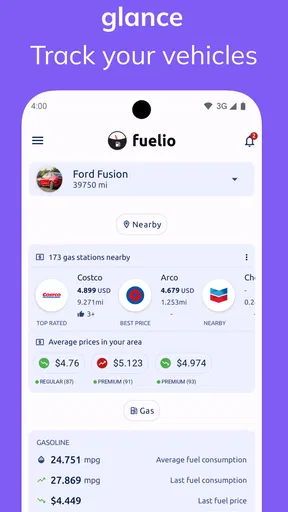
Another handy feature is the app's ability to show current gas prices in your area. It uses your location to pull up nearby prices, which is super convenient when trying to find the cheapest option. I found this particularly helpful when planning long road trips, as it allowed me to map out where to stop for the best deals.
I would use nearby prices as a prompt to compare options, not as a reason to make a detour without checking the practicalities. A slightly cheaper station may not be worth extra distance, especially if traffic or the route makes the stop inconvenient. On a road trip, I would check prices while planning and then choose a stop that fits the journey. For a short local drive, my usual station may be the simpler choice even if another listing looks better.
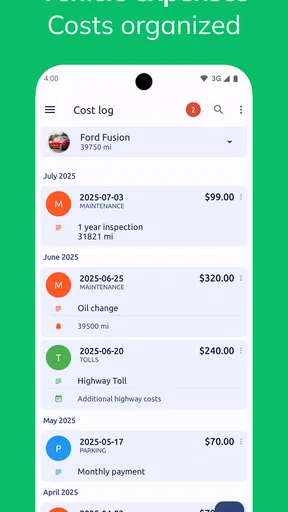
The app also offers a cost efficiency calculator. This tool helps you factor in other vehicle-related expenses, making it easier to see the total cost of owning and operating your vehicle. It’s a great way to keep your budget in check and make informed decisions about your driving habits.
Where it fits among other car tools
Compared with a general budgeting app, Fuelio is more focused on the car: fuel entries and odometer readings can be considered together instead of being reduced to a single spending category. Compared with a navigation app, it serves a different purpose. A navigation tool helps choose a route; Fuelio is for keeping a longer-term account of what driving costs. Drivers who mainly want turn-by-turn directions may be better served by their usual navigation app, while someone who wants a detailed maintenance or repair history may prefer a dedicated vehicle service log.
I see the strongest case for Fuelio in the middle ground: a driver who wants more context than a bank statement provides but does not want to build a spreadsheet. It is also a reasonable fit for someone curious about fuel economy who is willing to enter readings consistently. If I rarely drive, do not care about costs by vehicle, or know I will not keep up with manual logging, the extra record-keeping may feel like a chore rather than a benefit.
Additional Features
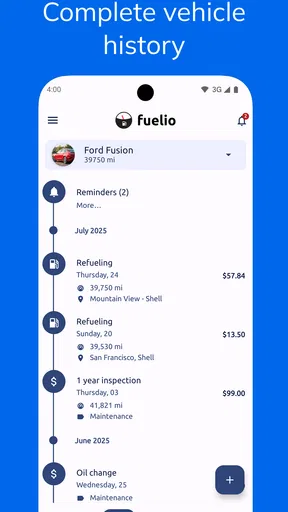
Aside from the core functionalities, Fuelio offers several additional features that enhance its usefulness. The app supports multiple vehicles, so if you have more than one car, you can track each one separately. This is perfect for families or car enthusiasts with more than one vehicle in the garage.
A realistic use is a family checking whether the shared car’s monthly fuel spending has changed while keeping a second car’s figures distinct. Another is a commuter who wants to review several months of entries before deciding whether a change in routine has affected fuel costs. These records will not establish the cause by themselves, but they give the driver a more reliable starting point for asking the right question.
Another feature I found quite useful is the cloud backup option. You can sync your data to the cloud, ensuring that you never lose your records. This feature gives me peace of mind, knowing that my data is safe even if I switch devices.
Cloud backup is convenient, but I would make the choice deliberately rather than turning it on by habit. A record kept only on one phone and a record synced elsewhere involve different trade-offs for control and convenience. I would review the available account and sync settings, understand what the app presents before enabling them, and choose the approach that matches how important continuity is to me. That is especially relevant if my mileage history is something I rely on for regular budgeting.
Everyday use and the limits of an estimate
Imagine I fill up after work, note the odometer, and enter the cost before putting the receipt away. A few weeks later, I can look at the accumulated entries rather than trying to reconstruct spending from memory. If the figures rise, I can compare periods and then consider whether I drove more, paid different prices, or changed my routes. That is a more useful workflow than expecting one calculation to tell me exactly what happened.
There is a related trade-off in fuel-economy comparisons: entries are most informative when the readings are accurate and recorded in a consistent way. A forgotten fill-up or a mistaken odometer value can make a later comparison less useful. I would treat unusual-looking results as a reason to check the entries first, not as proof that the car has developed a problem. The app helps make a record; it does not replace a mechanic’s inspection or careful review of receipts.
For gas prices, the same cautious approach applies. Nearby listings can help me decide where to look, but prices may change, and the cheapest visible option is not automatically the best stop for my route. I would use the feature when it can affect a decision I am already making, rather than repeatedly checking prices without a clear purpose. That keeps a handy tool from becoming another small distraction while driving.
The Verdict
Overall, Fuelio: gas log & gas prices is a robust and user-friendly app that delivers on its promises. It’s perfect for anyone looking to gain control over their fuel expenses and optimize their driving habits. The app’s simplicity, combined with its powerful features, makes it an indispensable tool for any vehicle owner.
I would soften “indispensable” for drivers who do not want to enter information themselves: the app’s value depends on a habit, and people looking for automatic tracking may prefer a tool designed around a different workflow. For someone comfortable logging fill-ups, though, the combination of fuel records, vehicle separation and summaries gives a clearer picture than memory alone. Its best feature is not a single statistic; it is the chance to build a consistent history and use it to make more considered decisions.
Whether you’re a budget-conscious driver or just someone who loves keeping track of details, this app is definitely worth a try. I’ve found it to be an invaluable companion in my quest to save money and make more informed decisions about my vehicle’s fuel consumption.
Who should give it a try
I would recommend it to drivers who regularly fill up, want to understand costs over time, or manage more than one vehicle and are willing to log entries as they go. It is less compelling for someone who only wants directions, expects fuel figures to be captured without effort, or needs a complete record of repairs and servicing. Those needs are better matched by navigation or maintenance tools built for those specific jobs.
The sensible way to start is to pick one vehicle and record a few fill-ups consistently before deciding whether the summaries are useful. Then consider whether nearby-price lookup or cloud syncing adds enough value for your routine to justify enabling those choices. If the basic logging already answers a question you care about, Fuelio has earned its place; if not, there is little reason to maintain a log simply because the option exists.
Pros
- Intuitive interface for easy navigation.
- Accurate fuel consumption tracking.
- Supports multiple vehicles.
- Automatic cloud backups.
- Real-time gas price updates.
Cons
- Limited customization options.
- No support for electric vehicles.
- Ads in free version.
- Some features require premium.
- Occasional sync issues.
FAQs for Fuelio: gas log & gas prices
What is Fuelio and how does it work?
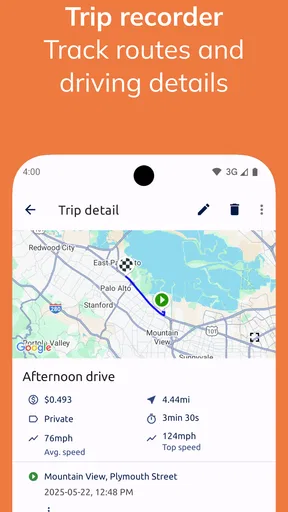
Fuelio is a comprehensive fuel tracking app that allows users to monitor their fuel consumption, expenses, and mileage. By inputting data each time you refuel, the app can provide detailed reports and insights into your vehicle's performance and fuel efficiency. It also offers features like tracking gas prices and trip logs, making it a useful tool for budget-conscious drivers.
Is Fuelio available on both Android and iOS platforms?
Yes, Fuelio is available for download on both Android and iOS platforms. Users can find the app on the Google Play Store for Android devices and the Apple App Store for iOS devices. Both versions offer similar features, ensuring a consistent experience across different operating systems.
Does Fuelio support multiple vehicles and currencies?
Fuelio supports multiple vehicles, making it ideal for users who own more than one car. You can easily switch between vehicles within the app and track separate logs for each. Additionally, Fuelio supports various currencies, which is helpful for users who travel frequently or live in countries with different currency systems.
Can I sync my Fuelio data across different devices?
Yes, Fuelio allows users to sync their data across multiple devices. By creating an account and enabling cloud sync, you can ensure that your data is backed up and accessible from any device. This feature is particularly useful for users who upgrade their phones or use the app on both a phone and a tablet.
Is Fuelio free, and are there any in-app purchases?
Fuelio is free to download and use, offering a robust set of features at no cost. However, there are optional in-app purchases available that unlock premium features, such as advanced reporting and additional customization options. These purchases are entirely optional and the core functionalities of the app remain free.


